Gemini can now make you thirty seconds of music based on prompts or photos, and will even use Nano Banana for custom art for it.
They say the feature is for fun and games, and very specific music requests that can be personal, like making a tune about your mum’s home cooked plantains.
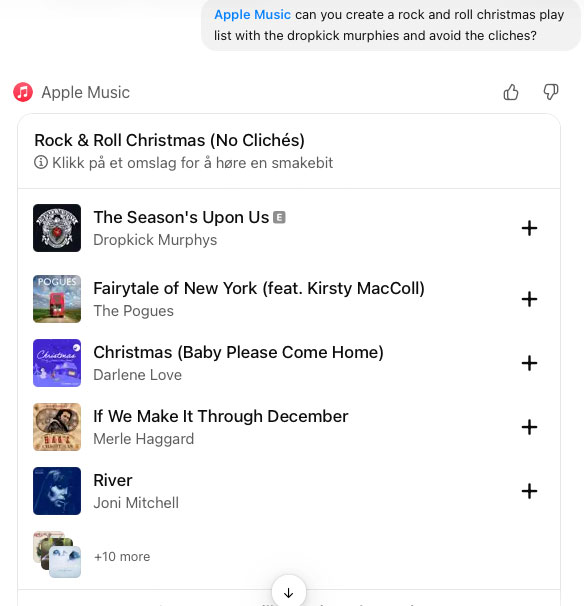
You can now find Apple Music in the App list for ChatGPT. (Picture: Screenshot)After days of rumors, Apple Music is now available as an app inside ChatGPT.
That means you can ask ChatGPT to create playlists, find songs, albums and artists — which can be helpful for those faint songs you can only describe from memory, or for recommending similar songs in the same lane.
The app can even create complex playlists based on natural language and preferences right in ChatGPT, and will give you an option to add it to your library — always asking politely first.
To add it, go to Settings->Apps->Browse apps in the ChatGPT app, and add it from the list. You will then have access by typing /Apple Music.
You will be asked to sign in to Apple Music from your account, and non-subscribers will only be able to listen to short previews of songs.
WMG is dropping its Suno lawsuit and will instead opt them in through licensing deals. (Picture: Adobe)Capping off a flurry of deals lately, one of the largest music publishers in the world is turning to cooperation instead of litigation.
The deal with Suno will allow «new fan experiences» for artists who have «opted in» and will see Suno making a lot of changes to receive licensing for the music.
Starting in 2026 with a new model, free users won’t be able to download their music from the site, and paid users can increase their downloads for more payment.
— AI becomes pro-artist when it adheres to our principles: committing to licensed models, reflecting the value of music on and off platform, and providing artists and songwriters with an opt-in for the use of their name, image, likeness, voice and compositions in new AI songs, said Robert Kyncl, CEO of WMG.
Music generation is on a tear these days, with people hardly noticing any difference from the hand made stuff. (Picture: Adobe)The Information (paywalled) is reporting that OpenAI is well underway to create a music generator.
It could be used to generate music from a text or audio prompt — or make a guitar background to a vocal track, or add music to videos.
Recruiting at The Juilliard School
Apparently, the AI lab has partnered with students from The Juilliard School of music to annotate scores that could be used to train the generator.
For now, it’s just an AI picture of TaTa, tomorrow it could be «real» music, if the internet doesn’t blow back too hard. (Picture: Stage Zero)The legendary producer, having discovered and shaped artists like Aaliyah, Missy Elliott, and Justin Timberlake, is now launching a truly AI-based artist for the mass market.
He is entering an already crowded field of virtual influencers, Japanese Vocaloid artists, and a booming industry for AI celebrities in China.